%20(1).png)
Disclosure: Goramp publishes this guide. We've included Goramp alongside Opendock and C3 Solutions and held all three to the same questions, including the places where Goramp isn't the best fit.
Choosing dock scheduling software isn't just finding a digital replacement for a spreadsheet. The right platform needs to fit how your warehouse actually operates: how carriers book, how drivers check in, how docks get assigned, what happens when a truck runs late, how your yard team manages trailers, and how the system connects to your WMS, TMS, or ERP.
That's why comparing feature lists alone is misleading — Goramp, Opendock, and C3 Solutions all check most of the same boxes on paper. The differences that actually matter show up in scope, carrier adoption, pricing structure, implementation model, and support terms. This guide walks through those with a practical buyer's checklist.
Goramp vs Opendock vs C3: at a glance
Capabilities and commercial terms change. Confirm exact configuration, pricing, and PO-validation behavior for your facilities directly with each vendor before signing.

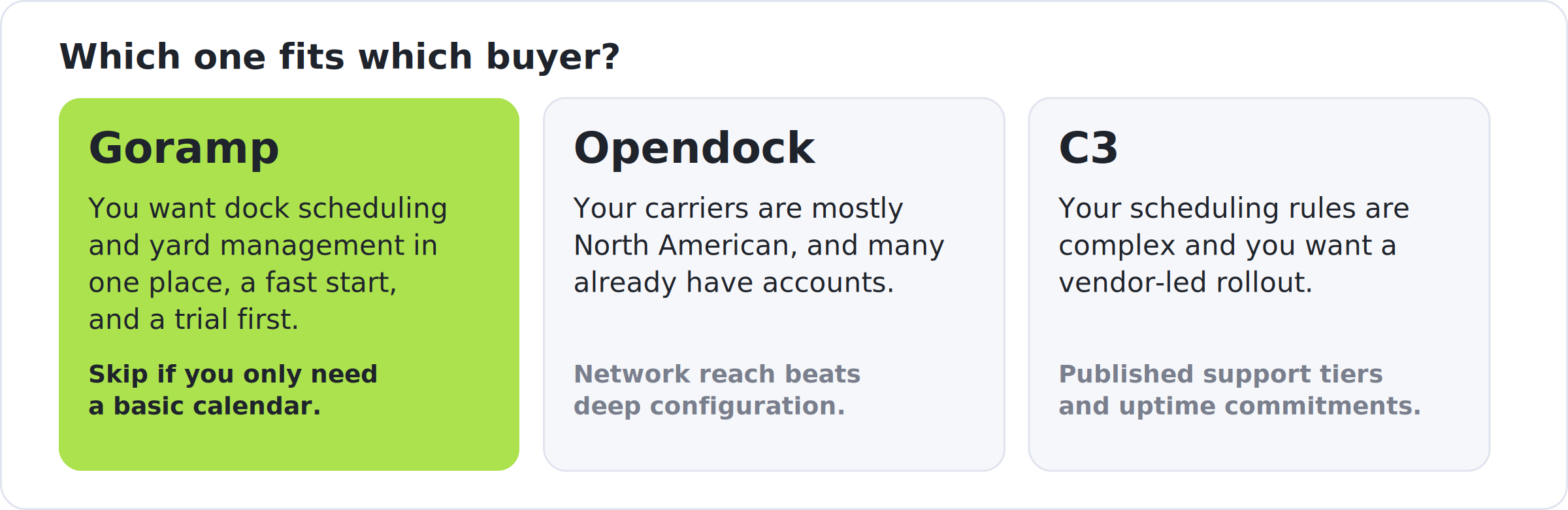
- Choose Goramp if you want dock scheduling and yard management in one platform, need to start quickly, operate globally, or want to trial before committing. Look elsewhere if you only need a basic appointment calendar for a small operation, or if your carrier base is almost entirely North American.
- Choose Opendock if your carriers are mostly North American and many already have accounts — network effect matters more here than deep configuration.
- Choose C3 if your scheduling rules are genuinely complex, you want a vendor-led implementation, and you value a long-established specialist with published support tiers and uptime commitments.
What should dock scheduling software actually do?
Dock scheduling software controls when trucks arrive and use your docks. Yard management software controls what happens once they arrive: check-in, trailer location, yard movements, dock assignment, and departure. The distinction matters because solving the appointment problem doesn't automatically solve the yard problem — a warehouse can have a perfectly organized calendar and still have trucks waiting at the gate, trailers parked in the wrong spot, or yard jockeys working off a radio and a notepad.
The first question to answer, before comparing any vendor, is whether you need appointment scheduling alone or the full dock-to-yard workflow.
The 10-question buyer's checklist
1. Do you need dock scheduling, dock planning, or yard management — or all three?
Dock scheduling answers "when should this truck arrive?" Dock planning answers "which dock should it use, and how is today's capacity organized?" Yard management answers "where is the truck or trailer now, and what happens next?"
Ask each vendor: Can I use dock scheduling on its own? Can I add yard management later without a re-implementation? Do the modules share the same operational data?
- Goramp: Dock scheduling and yard management run on one platform; the dock module also works standalone.
- Opendock: Scheduling is the core product, with gate operations and a yard module layered on.
- C3: C3 Reservations and C3 Yard are separate products built to work together — appointments feed automatically into the yard plan.
2. How easy is it for carriers to actually use?
A scheduling system only works if carriers use it. If they still call or email to book, you've just moved the phone tag into another interface.
The test: before any demo, try to book an appointment as a carrier who has never worked with you. Count the steps. Ask whether a driver could do it from a phone with zero training.
- Goramp: One-link registration with no IT setup; supports private booking links and per-facility permissions where you want tighter control.
- Opendock: Its main edge is network reach — carriers register for free and can book across many warehouses on the same account, and its Qued partnership lets carriers book from inside their own TMS.
- C3: A self-serve portal designed to need no formal training, with a recommended phased rollout (start with your largest carrier, expand from there).
3. Can the system handle your real scheduling rules — and what happens when the plan changes?
"Configurable" doesn't tell you much on its own. Every warehouse has real rules: palletized loads need 60 minutes, floor-loaded containers need 120, certain carriers can only use certain docks, some suppliers get priority. And the schedule will change — trucks arrive early, late, or with a different load than expected.
Ask each vendor: Show me how you'd model my hardest scheduling rule. Then: what happens when that truck is two hours late — does the system just flag the conflict, or help resolve it?
- Goramp: Configurable workflows for load types, durations, and exceptions, with dynamic rescheduling when trucks run early or late.
- Opendock: Customizable rules (lead times, appointment limits, dock-level restrictions) inside a more standardized structure; real-time updates on delays.
- C3: Durations and capacity constraints can be computed from any property of the appointment (load type, carrier, supplier), with color-coded shift indicators to help schedulers prioritize last-minute requests. Detailed rule modeling is C3's core strength.
4. How do driver check-in and gate operations work?
The appointment is only the start of the visit. Ask what happens when the driver actually reaches the facility: mobile check-in, kiosks, document capture, automated arrival/departure timestamps, and whether that gate event flows automatically into the same yard workflow as the appointment.
- Goramp: Driver self check-in with QR or API-driven validation and access control.
- Opendock: SmartGate uses cameras to automatically capture arrival and departure events and tie them to the appointment — reduces manual gate intervention but adds hardware to the implementation.
- C3: Mobile check-in via the C3 Hub progressive web app, compatible with any device; timestamps for arrival, on-dock, and departure, with load exceptions documented by camera in real time.
5. How deep are the integrations, really?
"Integrates with your WMS" can mean a certified two-way connector or a one-way export your developers have to maintain. Ask which method applies to your system, and ask for a reference customer running the same WMS or ERP version — not just "do you integrate with SAP," but "can I talk to a customer on the same SAP environment."
- Goramp: API, EDI, or file exchange; also connects to yard hardware (LPRs, kiosks, RFID, GPS, sensors).
- Opendock: Open API with two-way WMS/TMS data flow, so appointment activity and inventory status stay synchronized in both systems.
- C3: Web services (recommended for dynamic, seamless integration), XML file transfer to SFTP, or flat-file transfer to SFTP; confirmed compatibility with SAP via its web services interface. Also functions fully standalone with no integration at all.
6. Can it handle your multi-facility footprint?
A system that works well for one site can get unwieldy at twenty. If you're planning to scale, ask whether facilities can be managed centrally with different rules and permissions per site, whether carriers can work across multiple facilities on one account, and whether reporting rolls up across locations.
- Goramp: Supports multi-client configurations and role-based access — relevant for 3PLs managing multiple clients and carrier pools.
- Opendock: Warehouse users can view appointments across multiple locations from one login; scales from a few hundred monthly appointments to enterprise volumes.
- C3: Reservations and Yard both support multiple sites and multiple warehouses per site; users can be granted access to one or several sites.
7. Can the system prove ROI with your own data?
Before buying, get your baseline: average turnaround time, dock utilization, detention costs, no-show rate, carrier punctuality, scheduling labor hours. Then check whether the platform reports the same metrics without custom work.
- Goramp: Dashboards for truck turnaround, dock utilization, carrier punctuality, and detention exposure, fully customizable reporting engine
- Opendock: Dwell time by carrier, on-time arrival rate, dock utilization by bay, and automated carrier scorecards; its Loadsmart AI layer can also handle rebooking when a pickup slips.
- C3: A built-in Carrier Report Card, a fully customizable reporting engine, automatic no-show flagging after a configurable delay, and scheduled data extracts for your own BI tools.
8. What's the real total cost of ownership?
Don't compare subscription prices alone — factor in implementation, integrations, hardware (cameras, sensors), training, and carrier onboarding. Ask every vendor for pricing under three scenarios: your current operation, your operation plus one facility, and your operation at roughly double the volume.
- Goramp: Published starting price of $150/month with a free trial; scales with docks, facilities, and modules, with the full yard suite sitting in a higher tier.
- Opendock: No published pricing on its own site. Third-party sources report a flat annual fee per facility, roughly $6,000–$7,000/year, with no confirmed free trial — worth verifying directly given the size of that commitment.
- C3: A one-time implementation fee (varies by complexity) plus an annual usage fee based on volume, across four service tiers that also determine test-environment access and upgrade control.
9. What does implementation actually involve?
Time-to-value isn't just days-to-go-live — it's how much work your team has to do to get there. Ask who configures scheduling rules, who imports master data, who trains staff, and who runs carrier onboarding.
- Goramp: A quick-setup process for the basic dock module, reportedly configurable in hours to about a week; the full yard management rollout involves more guided onboarding.
- Opendock: A structured process — demo, account setup assistance, then go-live — rather than self-service signup.
- C3: Implementation can run as quickly as three weeks depending on scope, using C3's own agile methodology (CHAMP) with a dedicated project team, a scope document sent right after signing, and Super Users trained throughout the project.
10. What support, security, and SLA commitments do you get — in writing?
- C3: Publishes the most detail here: 24/7 emergency support from its Montreal offices, an uptime guarantee of 99.0–99.9% depending on service tier, and an ISO/IEC 27001 certification.
- Goramp and Opendock: We found no published uptime or SLA figures on the vendor sites reviewed for this guide. Ask each directly for support hours, SLA terms, and security certifications before signing.
What about smaller operations?
Not every warehouse needs a full yard-management platform. You may not need one if you run relatively few trucks per day, appointments rarely change, dock capacity isn't a constraint, and detention isn't a meaningful cost. The real question isn't "do I need software" — it's "at what point does the cost of manual coordination exceed the cost of automating it?" As truck volume, facilities, and carrier count grow, that line moves fast.
A simple way to estimate ROI
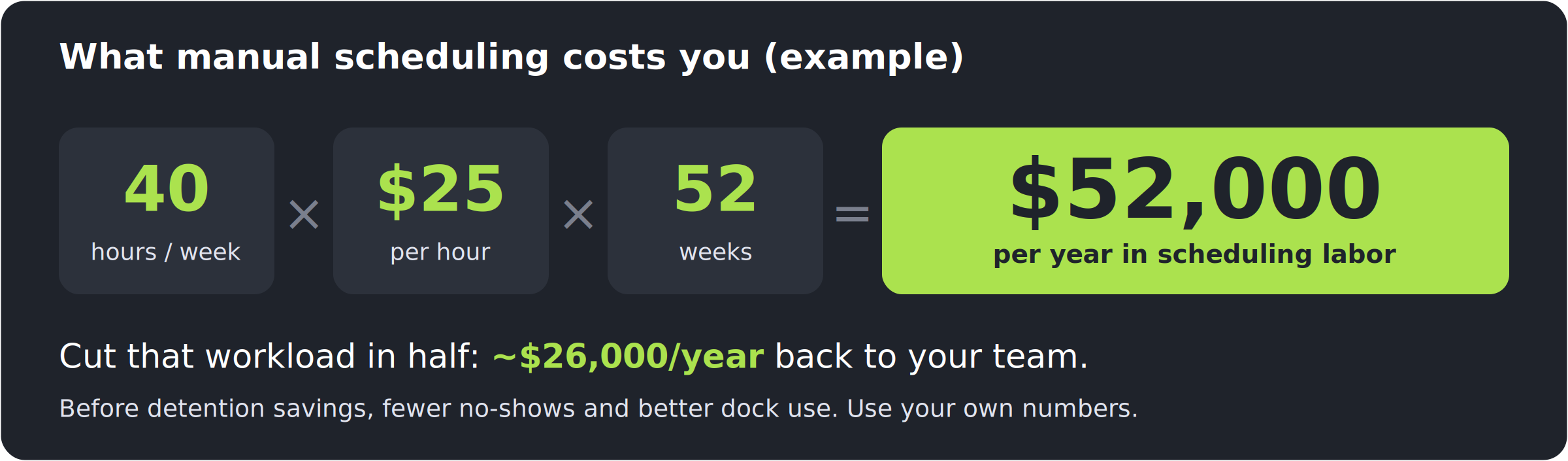
Start with what you already know. If your team spends 40 hours a week coordinating appointments at a fully loaded labor cost of $25/hour:
40 × $25 × 52 = $52,000/year in scheduling labor.
If software cuts that manual workload in half, that's roughly $26,000/year in released capacity — before counting reduced detention, fewer no-shows, and better dock utilization. Use your own numbers rather than industry averages; Goramp's ROI calculator can help build a more specific estimate.
RFP checklist
Use this during vendor demos or a formal RFP process.
Frequently asked questions
What's the difference between dock scheduling and yard management software?
Dock scheduling manages truck appointments and when vehicles should arrive. Yard management covers what happens after arrival — gate check-in, trailer location, yard movements, dock assignment, and departure. Some platforms, including all three covered here, combine both.
How much does dock scheduling software cost?
It varies significantly by vendor and structure. Some publish a monthly starting price, some charge a flat annual fee per facility, and others combine an implementation fee with a usage-based annual fee. Compare total cost of ownership at your current and expected future scale, not just the sticker subscription price.
How long does implementation take?
From hours for a basic standalone scheduling module to several weeks for a fully integrated dock-and-yard deployment. The biggest variables are integration scope, scheduling complexity, number of facilities, and how much carrier onboarding is needed.
Should I choose a vendor based on carrier network size?
Only if your carriers are already on that network. If most of your carriers are local or regional, how easily new carriers can onboard matters more than the size of an existing network.
What should I ask before signing?
Ask for a reference customer on your exact WMS or ERP version, get pricing in writing at your current and future scale, and book a test appointment yourself as a carrier before the demo.
Before you choose a vendor
Three things to do before signing anything:
- Test the carrier experience yourself. Book an appointment as if you were a carrier who's never worked with you.
- Test your hardest scheduling rule. Give the vendor a real example from your operation and ask them to configure it live during the demo.
- Build your own ROI model. Use your actual truck volume, labor costs, detention exposure, and scheduling workload — not vendor benchmarks.
The right platform isn't necessarily the one with the longest feature list. It's the one that fits your workflows, your carriers, your tech stack, and how complex your operation actually is.
If you'd like to see how Goramp fits your warehouse, book a demo or try the dock scheduling ROI calculator.


