
A Yard Management System (YMS) is software that helps warehouses, distribution centers and manufacturing facilities manage the movement of trucks, trailers and other assets within their yards. It connects activities at the entrance gate, parking areas and loading docks, giving teams better visibility into arrivals, trailer locations, yard movements and dock activity.
Instead of relying on spreadsheets, phone calls and manual yard checks, a YMS brings operational information together in one system. Depending on the platform, it can support driver check-in, gate management, trailer tracking, yard move coordination, dock scheduling, automated workflows and reporting.
A YMS helps logistics and warehouse teams understand what's happening in the yard, coordinate the next action and reduce the delays caused by disconnected processes.
In this guide, we'll explain how YMS software works, which features to look for, how to evaluate providers, what influences implementation costs and how to build a business case for investing in a yard management system.
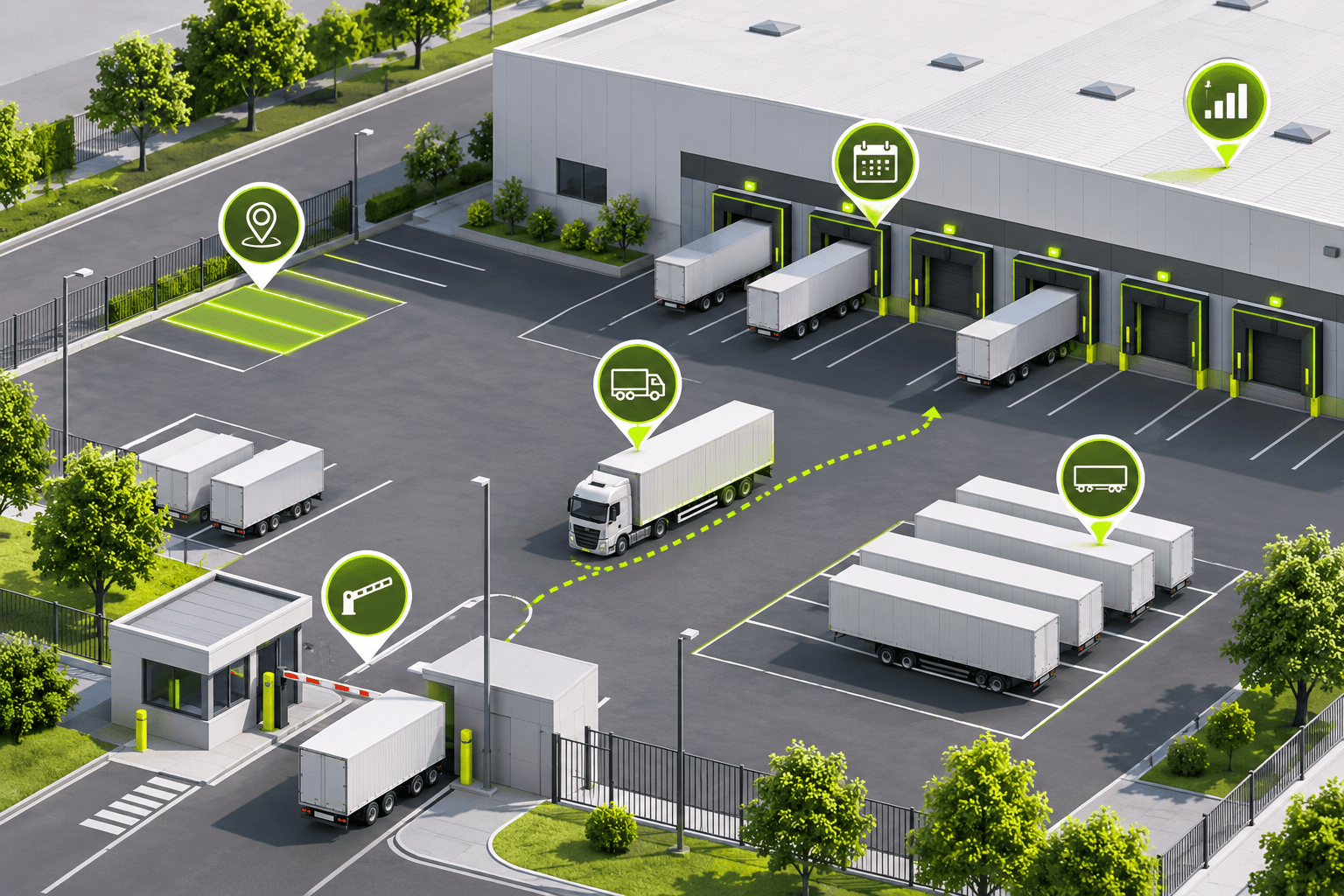
This article covers what a YMS does, its core components, the cost of manual yard management, how to measure ROI, and what to look for when choosing a solution.
What Does a Yard Management System Do?
A Yard Management System connects the activities taking place between a facility's entrance gate and warehouse docks. It gives logistics and warehouse teams a shared view of incoming trucks, trailer locations, yard occupancy and operational status.
Rather than managing each activity separately, a YMS helps coordinate the different stages of a vehicle's visit — from arrival and check-in to yard positioning, dock assignment and departure.
Depending on the provider and selected modules, a YMS can support the following functions:
- Gate management: Records truck arrivals and departures, validates incoming appointments and helps manage site access.
- Driver self-check-in: Allows drivers to register their arrival through a mobile device, kiosk or other check-in process.
- Trailer and asset tracking: Records where trailers, containers and other yard assets are located and tracks their operational status.
- Yard visibility: Gives teams a visual overview of yard occupancy, parking locations, dock activity and asset status.
- Yard move coordination: Helps assign and manage tasks for yard jockeys and spotters moving trailers around the facility.
- Dock scheduling and coordination: Connects truck appointments with dock availability and warehouse capacity.
- Alerts and reporting: Helps teams monitor dwell times, delays, missed appointments and other operational indicators.
- System integrations: Shares relevant information with warehouse management systems (WMS), transportation management systems (TMS) and enterprise resource planning (ERP) platforms.
The exact functionality varies between YMS providers. Some focus primarily on appointment scheduling and yard visibility, while others offer more extensive gate automation, asset tracking and yard execution capabilities.
YMS Software Features: What Should You Look For?
Not every Yard Management System offers the same functionality. Some platforms focus on tracking trailer locations and providing visibility across the yard, while others support more complex processes such as automated gate operations, dock coordination and yard move execution.
When evaluating YMS software, it's useful to separate the core capabilities most facilities need from more advanced features that depend on operational complexity.
1. Gate Management and Driver Check-In
Gate management helps facilities record and control vehicle entry and exit. Instead of manually recording every truck arrival, teams can use digital check-in processes to capture relevant information and validate incoming appointments.
Look for capabilities such as:
- Digital driver check-in and check-out.
- Appointment and shipment validation.
- Arrival and departure timestamps.
- Driver notifications and instructions.
- Access control and visitor management.
- Kiosk or mobile check-in options.
2. Trailer Tracking and Yard Visibility
A YMS should help teams understand where trailers and other assets are located without depending entirely on manual yard checks.
Depending on the platform, tracking information can be collected through gate events, mobile updates, barcode or RFID scanning, GPS or camera-based technologies.
Look for:
- Trailer location and status tracking.
- A visual yard map.
- Yard occupancy and parking availability.
- Loaded, empty, staged and waiting statuses.
- Trailer dwell-time monitoring.
- Search and filtering capabilities.
3. Yard Move Management
When trailers need to be moved between parking locations, staging areas and dock doors, teams need a reliable way to communicate and prioritize those tasks.
YMS software can help coordinate these movements digitally.
Relevant capabilities include:
- Digital yard move requests.
- Task assignment to yard jockeys or spotters.
- Move priorities and task statuses.
- Mobile access for yard personnel.
- Records of completed movements.
- Visibility into pending and overdue tasks.
4. Dock Scheduling and Planning
Dock coordination connects arrivals with the availability of loading and unloading resources. A YMS with dock scheduling capabilities can help teams coordinate appointment times, dock assignments and actual yard conditions.
Look for:
- Inbound and outbound appointment management.
- Dock availability and capacity planning.
- Appointment changes and rescheduling.
- Load and purchase order validation.
- Visibility into dock status.
- Coordination between yard and warehouse teams.
Dock scheduling and yard management are related but distinct capabilities. For a deeper explanation, see our guide to Yard Management vs. Dock Scheduling.
5. Automated Workflows and Alerts
Automation can reduce repetitive coordination and help teams respond to operational exceptions.
Depending on the platform, this may include:
- Automated notifications for arrivals and delays.
- Rules-based check-in and check-out workflows.
- Alerts for trailers exceeding defined dwell-time thresholds.
- Automated task creation and assignment.
- Notifications when operational statuses change.
- Configurable workflows based on facility requirements.
6. Reporting and Analytics
A YMS should provide operational data that helps managers understand performance and identify recurring bottlenecks.
Useful reporting capabilities include:
- Average truck turnaround time.
- Trailer dwell time.
- Gate processing times.
- Dock utilization.
- Appointment adherence.
- Yard move activity.
- Carrier and supplier performance.
- Historical operational trends.
7. System Integrations
A YMS should fit into your existing technology environment rather than create another disconnected source of information.
Evaluate how the system connects with:
- Warehouse Management Systems (WMS).
- Transportation Management Systems (TMS).
- Enterprise Resource Planning (ERP) platforms.
- Carrier and supplier systems.
- Gate hardware and identification technologies.
- Existing reporting and business intelligence tools.
Ask providers whether integrations are native, API-based or require custom development. These differences can affect implementation effort, ongoing maintenance and total cost.
Core vs. Advanced YMS Features
The right feature set depends on your facility. A single-site warehouse with relatively simple processes may not need the same level of automation as a large distribution network handling hundreds of truck movements each day.

When Does a Business Need a Yard Management System?
Not every warehouse needs a dedicated Yard Management System. The need usually becomes clearer as the volume and complexity of yard activity increase.
A facility may benefit from YMS software when:
- Trailer locations are difficult to track: Teams depend on physical yard checks, phone calls or individual employees to find trailers.
- Gate processes are manual: Staff spend significant time registering arrivals, checking appointments and communicating with drivers.
- Yard moves are difficult to coordinate: Yard jockeys receive requests through radios, calls or informal instructions, making priorities difficult to manage.
- Warehouse and yard teams lack shared visibility: Teams work with separate spreadsheets or systems and cannot easily see the same operational information.
- Truck arrivals and dock capacity are disconnected: Appointments, actual arrivals and dock availability are managed separately.
- Operational performance is difficult to measure: Managers lack consistent data on dwell time, turnaround time, yard utilization and recurring delays.
A dedicated YMS becomes particularly useful when these challenges happen frequently enough to affect throughput, labor capacity, carrier relationships or service levels.
For a closer look at the operational causes of these problems, read our Complete Guide to Yard Management.
Key Benefits of a Yard Management System
A Yard Management System helps facilities replace disconnected manual processes with more structured, visible and coordinated operations. The benefits depend on the features implemented and how well the system fits the facility's workflows.
Improved Yard Visibility
A shared view of trailer locations, yard occupancy and operational status helps teams understand what's happening across the facility. Instead of relying on manual yard checks or asking colleagues for updates, employees can access the same operational information.
Faster and More Consistent Gate Processing
Digital arrival records and driver check-in workflows help reduce repetitive data entry and make it easier to identify incoming trucks. Where supported, appointment validation and automated gate processes can further streamline vehicle entry and exit.
Better Trailer and Asset Utilization
Knowing where trailers are located and whether they are loaded, empty, staged or waiting makes it easier to use available yard space effectively. Teams can identify idle assets and avoid unnecessary searches or movements.
More Efficient Yard Move Coordination
Digital task assignment gives yard teams a clearer view of which trailers need to move, where they need to go and which tasks have been completed. This can reduce reliance on radio calls and informal instructions.
Improved Coordination Between Yard and Warehouse Teams
When yard activity is visible to warehouse teams, they can better prepare for incoming loads, coordinate dock assignments and respond to changes in arrival times or operational priorities.
Better Operational Reporting
A YMS creates structured records of arrivals, departures, trailer movements and other yard events. These records help managers monitor performance, identify recurring delays and make decisions based on operational data rather than assumptions.
How Does YMS Software Work?
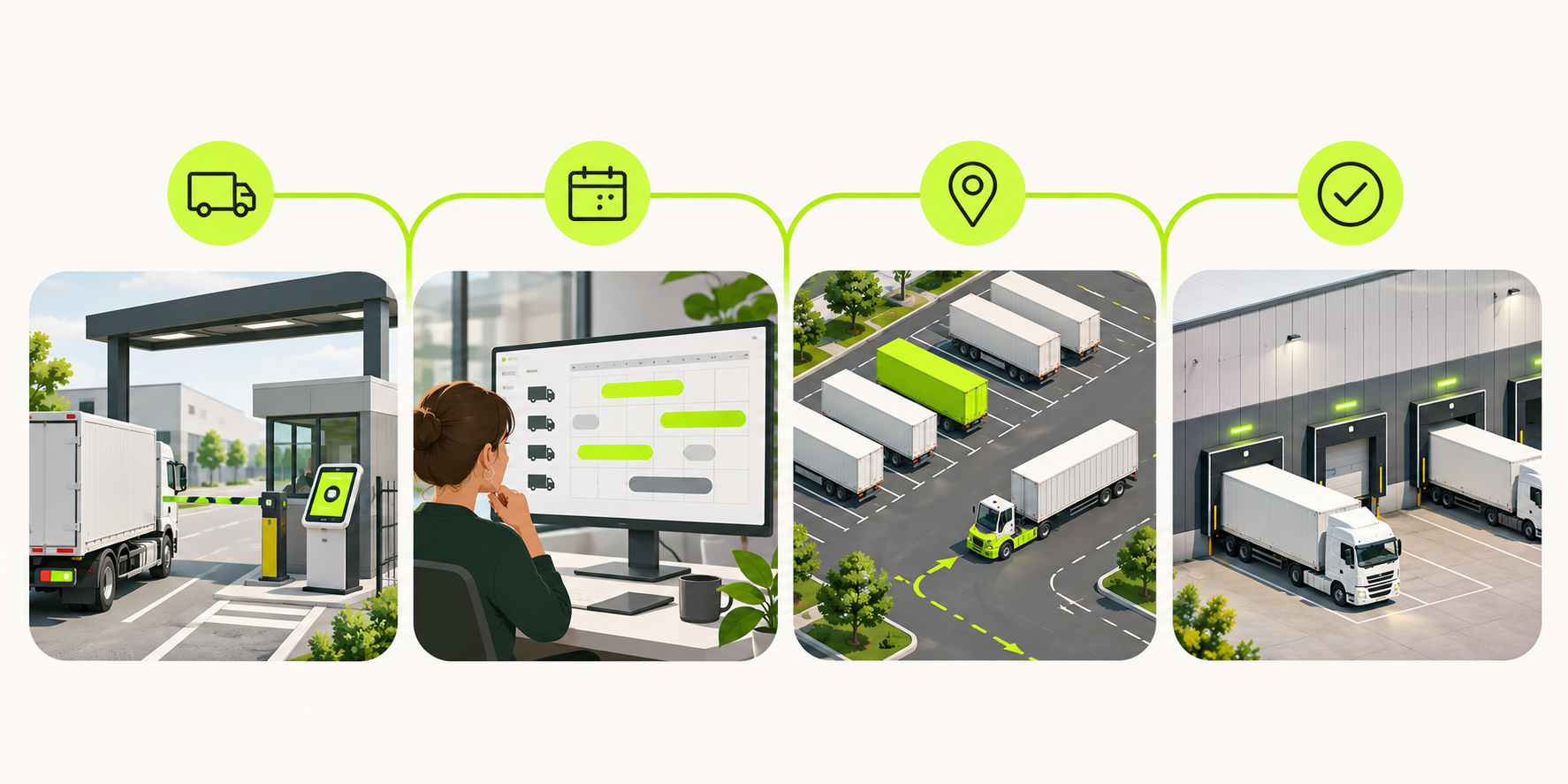
A Yard Management System connects information and activities across the different stages of a truck's visit to a facility. While workflows vary by operation and software provider, a typical process looks like this:
1. Prepare for Incoming Arrivals
Before a truck reaches the facility, appointment and shipment information can be made available to the yard team. Depending on the system, this may include the expected arrival time, carrier details, load information and planned dock or service requirements.
This gives teams an opportunity to prepare for incoming vehicles rather than relying only on information collected at the gate.
2. Record Arrival and Check-In
When the truck arrives, the system records the arrival and helps the gate team verify relevant information. Driver self-check-in, appointment validation and digital arrival records can reduce manual administration.
3. Track the Trailer and Its Yard Location
Once checked in, the trailer's location and status can be recorded in the YMS. A digital yard map helps teams see where assets are parked, which areas are occupied and which trailers are ready for the next step.
4. Coordinate Yard Moves and Dock Assignments
When a trailer needs to move, the system can help create and assign a task to the appropriate yard personnel. Dock scheduling and planning capabilities can also help coordinate trailer movements with warehouse capacity and priorities.
5. Record Departure and Review Performance
When the truck leaves, the system records the departure and closes the relevant visit or movement record. Over time, these records can be used to review turnaround times, dwell time, appointment adherence and other operational indicators.
The result is a more connected process in which the gate, yard and warehouse teams work with shared information. The level of automation depends on the YMS, its configuration and the systems and hardware connected to it.
How to Choose the Right Yard Management System
Choosing a Yard Management System is not just about comparing feature lists. The right solution should reflect your facility's layout, daily truck volume, operational processes, existing technology and plans for growth.
Before selecting a provider, evaluate the following areas.
1. Understand Your Facility's Requirements
Start by documenting the scale and complexity of your operation.
Consider:
- Number of facilities and yards.
- Number of gates and dock doors.
- Average daily truck arrivals and departures.
- Number of trailers and other tracked assets.
- Inbound and outbound shipment volumes.
- Number of yard personnel and shift patterns.
- Current check-in, scheduling and yard move processes.
These details will help you identify which capabilities are essential and which would be optional.
2. Check the Level of Yard Visibility
Ask how the system captures and updates trailer locations and statuses.
Can employees see where each trailer is parked? Can they distinguish between loaded, empty, staged and waiting assets? Does the platform provide a visual yard map? How frequently is information updated?
Also clarify whether tracking depends on manual updates, mobile devices, GPS, RFID, cameras or other technologies.
3. Evaluate Yard Execution Capabilities
Visibility is useful, but teams also need to act on the information.
Find out whether the system supports digital yard move requests, task assignment, priorities, mobile access for yard jockeys and records of completed movements.
If coordinating spotters is a major operational challenge, make sure you test these workflows during the demonstration.
4. Review Gate and Dock Coordination
Evaluate how the system handles driver arrivals, appointment validation, check-in and dock assignments.
Consider whether it supports both inbound and outbound operations, how appointment changes are handled and whether yard activity is connected to dock availability.
If dock scheduling is particularly important to your operation, compare it as a dedicated capability rather than assuming every YMS includes the same scheduling functionality.
5. Verify System Integrations
Check how the YMS will exchange information with your existing WMS, TMS, ERP and other systems.
Ask vendors:
- Which integrations are available today?
- Are they native connectors or API-based?
- Does integration require custom development?
- Which data is exchanged between systems?
- Who is responsible for integration maintenance?
- Are there additional implementation or licensing costs?
Request a technical explanation for your actual systems instead of relying on a general statement that a platform "integrates with ERP and WMS."
6. Assess Reporting and Performance Measurement
A useful YMS should help you measure the operational indicators that matter to your facility.
Check whether reports cover truck turnaround time, trailer dwell time, gate processing, dock utilization, appointment adherence and yard move activity.
Also ask whether data can be exported or shared with your existing reporting tools.
7. Consider Implementation and Scalability
Evaluate the work required to configure the system, connect it to your existing technology and train employees.
Ask how the provider handles onboarding, support, future configuration changes and the addition of facilities or operational workflows.
The solution should fit your current requirements without making future expansion unnecessarily difficult.
8. Understand the Total Cost of Ownership
Look beyond the subscription price. Consider implementation, integration, training, hardware, optional modules, support and any costs associated with increasing usage or adding facilities.
Request a breakdown of both initial and recurring costs before making a decision.
YMS Vendor Evaluation Checklist
Use these questions when comparing providers:
A practical tip: Ask each vendor to demonstrate the same real-world scenario using your facility's requirements. For example, have them show how an incoming truck is checked in, how its trailer is located, how a yard move is assigned and how the warehouse team receives the relevant update. This makes it easier to compare actual functionality instead of relying on different sales demonstrations.
We've collected our top 5 yard management solutions to help you decide.
What Does a Yard Management System Cost?
The cost of a Yard Management System depends on the size of the operation, the functionality required and the complexity of implementation. There is no single standard price across the market, as vendors use different pricing models and package their features differently.
When evaluating YMS pricing, consider the following cost components.
1. Software Subscription
Many cloud-based YMS platforms are sold through recurring subscriptions. Pricing may depend on the number of facilities, users, tracked assets, transaction volumes or selected modules.
Ask whether the quoted subscription includes the functionality your operation needs or whether additional modules incur separate fees.
2. Implementation and Configuration
Initial implementation may include process mapping, system configuration, data preparation, testing and project support. More complex operations may require additional work to accommodate specific workflows, facility layouts or approval processes.
3. System Integrations
Connecting a YMS to existing WMS, TMS and ERP platforms may involve native connectors, API configuration or custom development.
Clarify which integrations are included in the quoted price and whether ongoing maintenance creates additional costs.
4. Hardware and Automation
Some facilities may require additional equipment to support their preferred workflows. Depending on the implementation, this could include check-in kiosks, cameras, automatic number plate recognition (ANPR), RFID readers, scanners or gate-control hardware.
Not every YMS requires dedicated hardware, so confirm which capabilities can be supported with the devices and infrastructure you already have.
5. Training, Support and Maintenance
Consider the cost of onboarding gate staff, yard teams, dock coordinators and managers. Also review what level of technical support is included, whether training is charged separately and how ongoing product updates are handled.
What to Include in a YMS Quote Comparison
When requesting proposals, ask each provider to separate:
- Initial software setup and implementation.
- Recurring subscription fees.
- Integration and custom development costs.
- Hardware and installation.
- Training and onboarding.
- Support and maintenance.
- Additional modules or usage fees.
- Costs of adding facilities, users or operational volume.
Comparing these components gives you a more realistic view of the total cost of ownership than comparing subscription prices alone.
A lower initial subscription does not necessarily mean a lower overall investment. The implementation effort, integration requirements and level of functionality included can make a significant difference.
How to Calculate the ROI of a Yard Management System
A Yard Management System can create value by reducing manual administration, improving asset visibility, coordinating yard movements and helping facilities make better use of available capacity.
However, the financial impact varies depending on the facility's existing processes, operating volume and the capabilities implemented. The best way to estimate the return is to establish a baseline before selecting a solution and compare it with actual performance after implementation.
5 KPIs to Measure Before and After YMS Implementation
1. Truck Turnaround Time
Measure the time between a truck's arrival at the facility and its departure. Track the average by shipment type, carrier or facility to understand where delays occur.
2. Detention Costs
Record the monthly charges associated with trucks waiting beyond the agreed free-time period. Compare costs before and after implementation, while accounting for changes in volume and operating conditions.
3. Manual Labor Hours
Estimate the time employees spend on manual check-ins, trailer searches, phone calls, scheduling updates, reporting and yard move coordination.
Measure how much of this work is reduced after introducing digital workflows.
4. Trailer Dwell Time and Yard Utilization
Track how long trailers remain in the yard and how effectively available parking locations are used. This can help identify idle assets, unnecessary movements and capacity constraints.
5. Yard and Dock Coordination
Monitor appointment adherence, dock utilization, yard move completion and delays between arrival, staging and dock assignment.
These indicators help show whether better coordination is improving the flow of vehicles through the facility.
How to Calculate Potential YMS Savings
Start with savings that can be measured and translated into money.
Monthly labor savings
Hours of manual work reduced per month × fully loaded hourly labor cost.
Monthly detention savings
Baseline monthly detention charges − detention charges after implementation.
Total measurable monthly savings
Monthly labor savings + monthly detention savings + other separately verified savings.
Make sure you avoid double-counting. For example, the time saved locating trailers should not be counted again as a separate labor saving if it is already included in the total reduction in manual work hours.
Calculate Payback Period
Once you have estimated the savings and costs, you can calculate the expected payback period.
Monthly net savings
Total measurable monthly savings − recurring monthly YMS costs.
Estimated payback period
One-time implementation costs ÷ monthly net savings.
This calculation is meaningful only when monthly net savings are positive. Use actual costs and conservative estimates rather than assuming every operational improvement will translate directly into financial savings.
Calculate First-Year ROI
For a first-year view, include both the initial investment and recurring costs.
First-year ROI
(First-year quantified benefits − first-year total costs) ÷ first-year total costs × 100.
Include software subscriptions, implementation, integrations, hardware, training and other relevant costs in the calculation.
How to Implement a Yard Management System
Implementing a YMS involves more than installing software. The system needs to reflect how your facility operates, connect with relevant existing systems and be practical for the employees who use it every day.
A structured implementation typically involves four stages.
1. Map Existing Processes and Define Requirements
Start by documenting how trucks, trailers and other assets currently move through your facility.
Identify the processes you want to improve, such as driver check-in, trailer tracking, yard move coordination, dock assignments and operational reporting.
Involve the employees who manage these processes directly, including gate staff, yard personnel, dock coordinators and warehouse managers.
Also establish baseline performance measures so you can evaluate the impact of the new system later.
2. Configure the System and Plan Integrations
Work with the provider to configure the YMS around your facility layout, operational rules and workflows.
This may include setting up yard locations, gates, dock doors, appointment rules, user permissions, notifications and reporting requirements.
Review the integration plan for your WMS, TMS, ERP and any relevant hardware. Confirm which data needs to move between systems and who is responsible for testing and maintaining each connection.
3. Pilot the System and Train Employees
Where possible, introduce the system through a controlled pilot before expanding it across the entire operation.
Test real scenarios, including truck arrivals, driver check-in, trailer location updates, yard move requests and departure records.
Provide role-specific training so each team understands how to use the system in its daily work. Collect feedback from employees and address workflow issues before the wider rollout.
4. Monitor Performance and Improve Workflows
After go-live, review adoption and operational performance regularly.
Compare the original baseline with new data on turnaround time, dwell time, check-in processes, yard moves and other relevant KPIs.
Use employee feedback and reporting to identify areas where workflows need to be adjusted. As the operation changes, review whether the system configuration and integrations still support its requirements.
A successful YMS implementation should result in a system that employees use consistently and that provides reliable information for operational decisions.
Is It Time to Consider a Yard Management System?
If your facility still relies on spreadsheets, manual check-ins, radio calls or disconnected systems to coordinate yard activity, it may be time to evaluate a dedicated Yard Management System.
Start by documenting your current processes and measuring a few key indicators, such as truck turnaround time, trailer dwell time, manual coordination hours and detention costs.
Use this information to identify where visibility, automation or better coordination could make the biggest difference.
Then compare YMS providers based on their functionality, integration capabilities, implementation requirements and total cost of ownership.
Explore Goramp's Yard Management Software to see how digital yard visibility, driver check-in, automated yard move tasks and connected workflows can support your operation.
Ready to explore what a YMS could look like for your facility?


